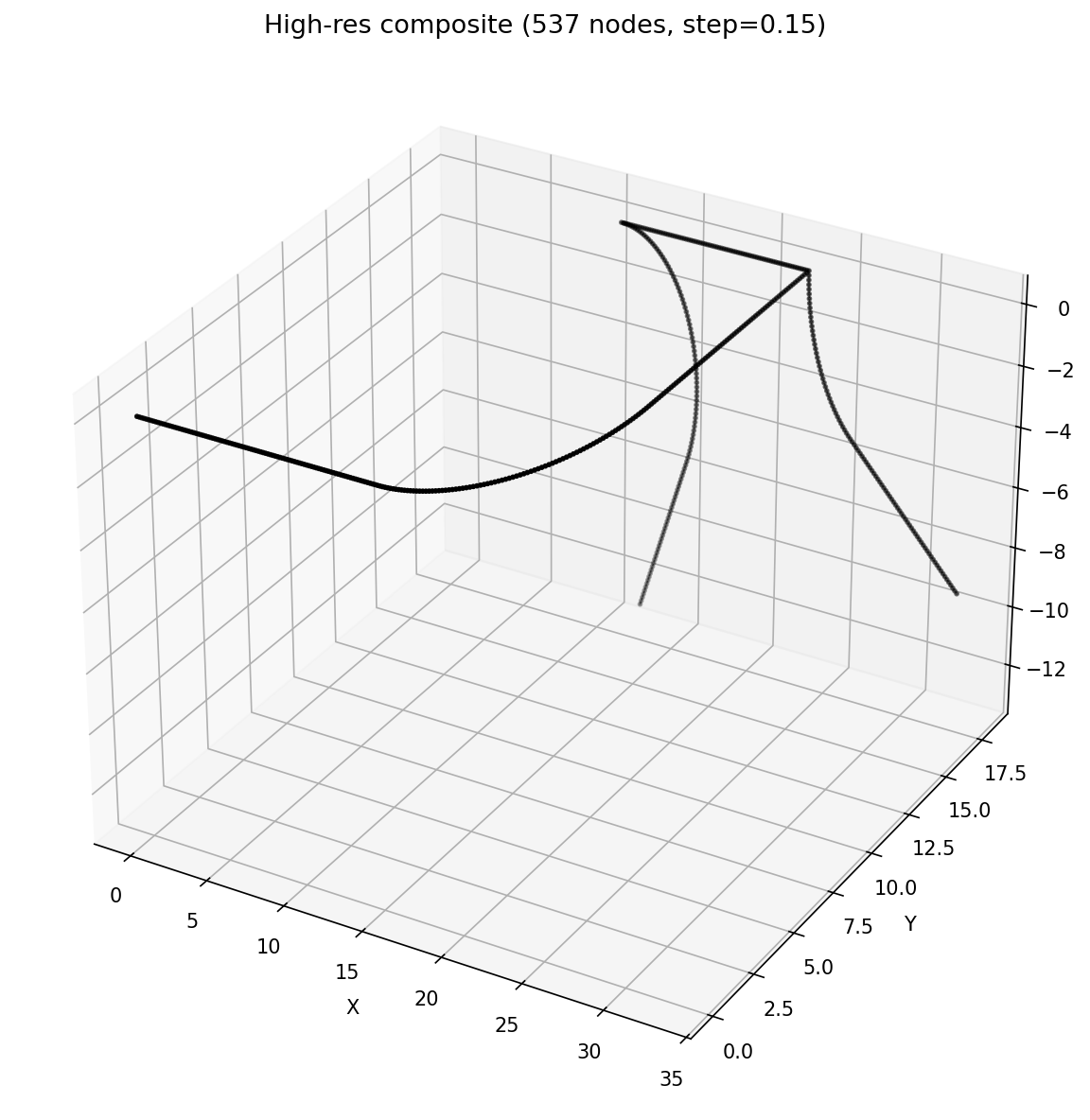
We're open-sourcing Shape V1, an AI-powered geometry analysis tool that extracts, segments, and makes 3D pipe and duct geometries queryable through natural language. Shape V1 is the first step toward making CFD preprocessing intelligent.
The Problem
Before any CFD simulation can run, engineers spend hours manually inspecting geometry: identifying pipe segments, measuring bend angles, finding junctions, and understanding the overall topology. This preprocessing step is tedious, error-prone, and entirely manual.
Shape automates this. Upload a STEP file, and within seconds you have a fully segmented, classified, and queryable representation of your geometry.

How It Works
Shape processes 3D geometry through a multi-stage pipeline that combines classical computational geometry with AI-powered natural language understanding.
- Surface mesh extraction from STEP files using gmsh and meshio
- Centerline extraction from pipe/duct geometries via VMTK or heuristic methods
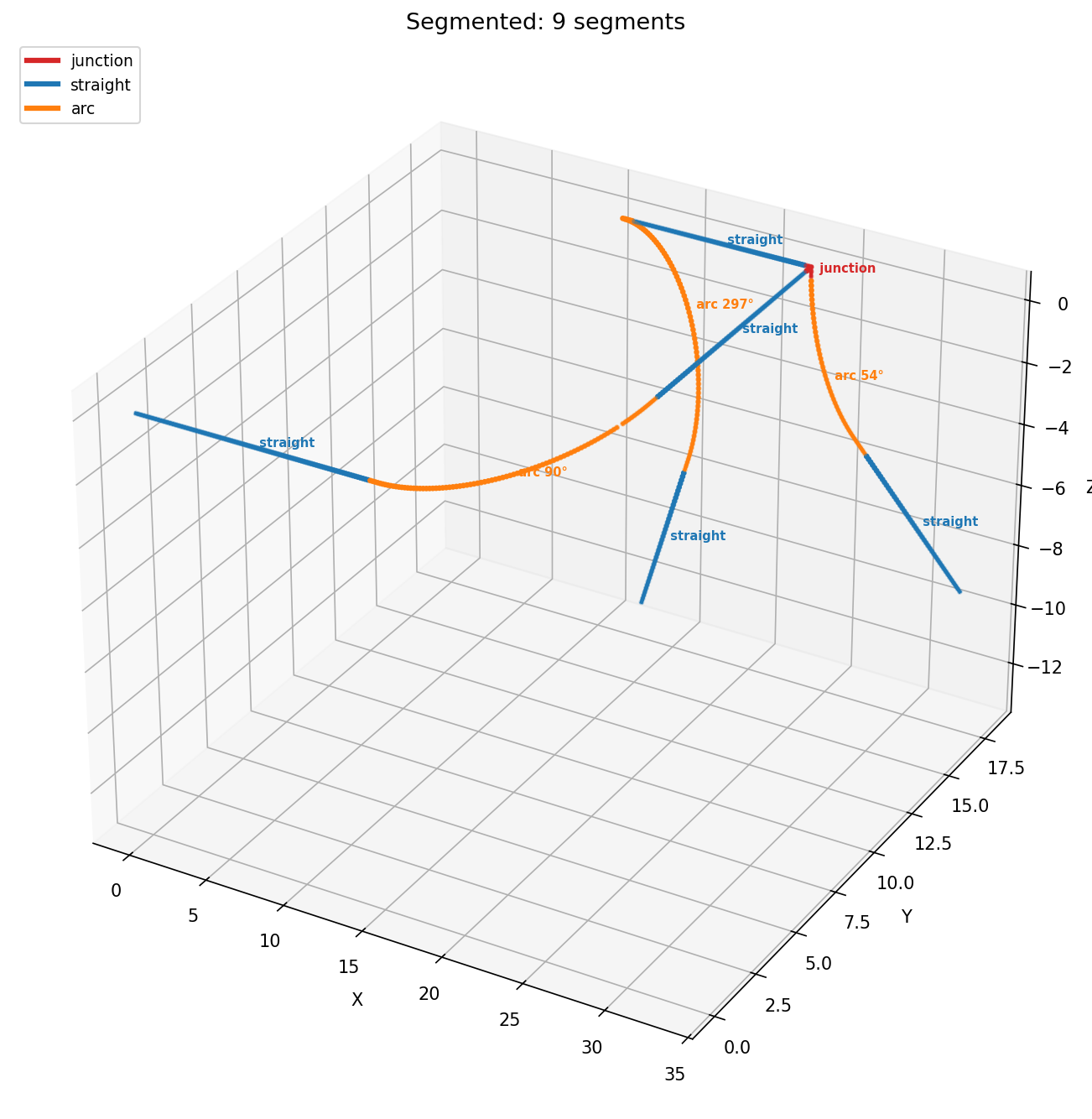
- Graph-based segmentation using Menger curvature analysis and hysteresis labeling
- Automatic classification into segment types: straight, arc, corner, and junction
- Arc angle estimation through vertex turning angle summation
- GATv2 (Graph Attention Network) embeddings for downstream ML tasks
Natural Language Queries with Gemini
Once your geometry is segmented, you can ask questions about it in plain English. Shape uses Google's Gemini to understand your questions and answer them using the actual segment data, no hallucination, no guessing.
Under the hood, Gemini has access to 8 tools it can chain together autonomously: listing segments, filtering by type or angle, counting, summing fields, grouping, ranking, describing individual segments, and highlighting them in the 3D viewer. You ask a question, and Gemini decides which tools to call and in what order.
For example, asking "Find all arcs above 60 degrees and highlight the sharpest one" triggers a chain: filter → rank → highlight → natural language summary. All in one query, fully autonomous.
Real-Time Streaming
Shape uses WebSockets to stream pipeline progress in real time. As geometry is processed, mesh extraction, centerline computation, segmentation, each step streams updates to the client. The 3D viewer (built with VTK.js) renders results as they arrive, including segment highlighting driven by AI queries.
Architecture
Shape is built around four major blocks:
Geometry Ingest
Reads STEP, JSON, and MSH files. Extracts surface meshes via gmsh + meshio. Detects and extracts centerlines from pipe geometries using VMTK or heuristic methods.
Segmentation Engine
Splits the centerline graph into meaningful segments using Menger curvature analysis, hysteresis labeling, and collinearity detection. Classifies each segment as straight, arc, corner, or junction.
AI Query Layer
Gemini 3 Flash with 8 DSL tools for natural language queries. Chains tools autonomously across up to 8 rounds per query. Streams results in real time over WebSockets.
ShapeEncoder (ML)
A GATv2 graph neural network with attentional aggregation. Maps each segment to a 256-dim L2-normalized embedding. Trained with supervised contrastive loss (SupCon).
Training: Supervised Contrastive Loss
The ShapeEncoder is trained using supervised contrastive loss (SupCon). The idea is simple: embeddings of similar segments should be close together, and embeddings of different segments should be far apart.
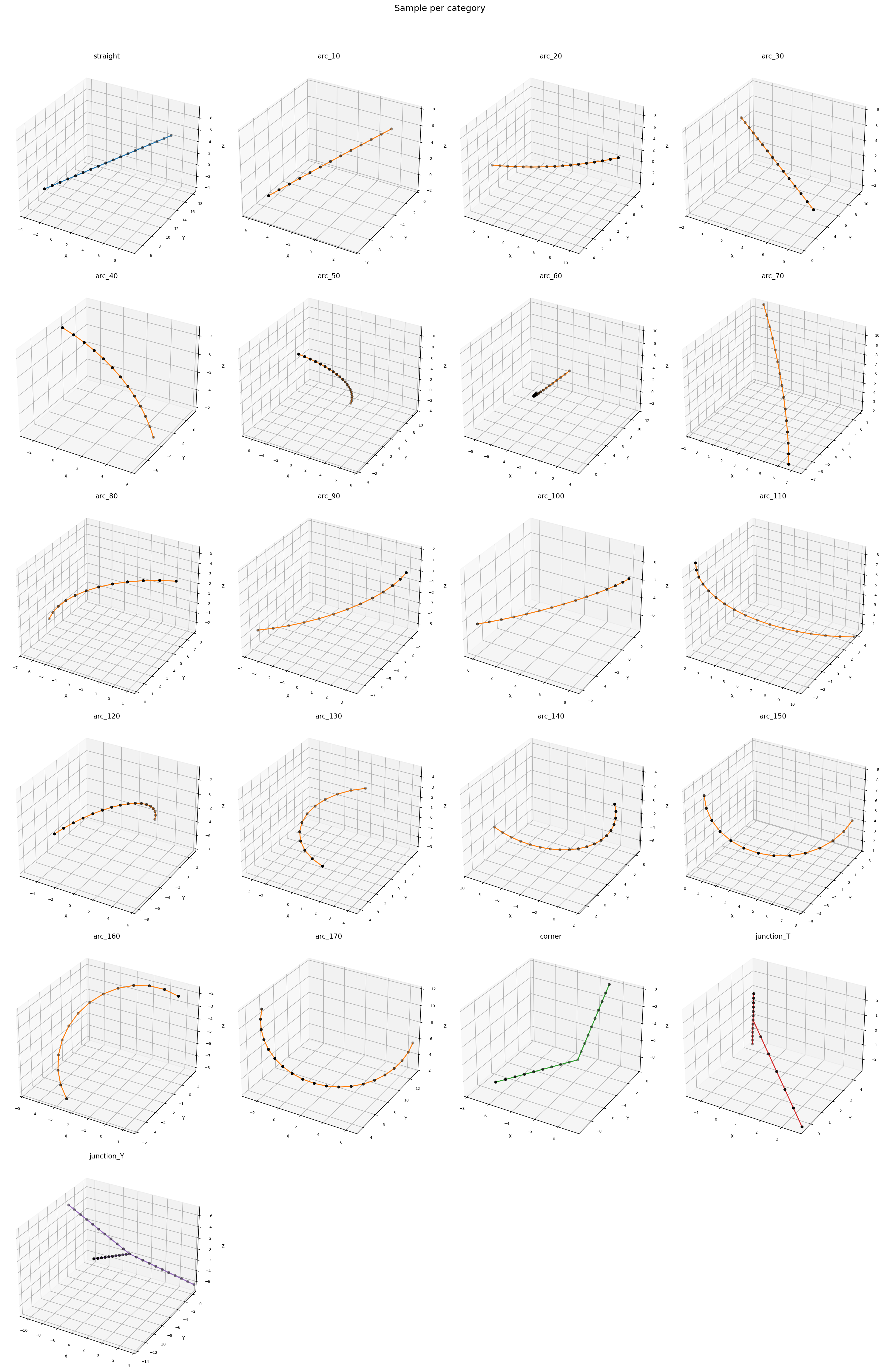
Positive pairs are defined by a custom mask: two arcs are positive if their angle difference is within 10°, and two non-arc segments are positive if they share the same motif type (straight, corner, junction). Everything else is negative.
Where zᵢ are L2-normalized embeddings, τ = 0.07 is the temperature, P(i) is the set of positive pairs for sample i, and the denominator sums over all samples except i. The loss pulls positive pairs together and pushes negatives apart in the embedding space.
Segment Types
Shape classifies every segment of your geometry into one of four types:
- Junction: nodes where three or more pipes meet
- Straight: zero-curvature segments (κ ≈ 0)
- Arc: gradual curves with roughly constant curvature
- Corner: short, sharp curvature spikes (tight bends)
Why Geometry Understanding Matters for CFD
Geometry understanding is not optional for good simulation, it is the foundation. A good mesh is not simply a dense mesh. The goal is to place resolution only where it matters: near walls, at sharp bends, around junctions, and in regions where the physics demands it. Extra, blind meshing everywhere is wasted compute.
This is especially true for arbitrary, complex geometry. When pipes branch, bend, and twist in unpredictable ways, knowing the structure of the geometry becomes extremely valuable. Without it, you either over-mesh (expensive) or under-mesh (inaccurate).
In CFD, meshing is not only geometry-aware but also physics-aware. A 90° bend needs finer resolution than a straight pipe because the flow separates, recirculates, and generates secondary vortices. A junction where three pipes meet creates mixing zones that require careful refinement. Shape gives you exactly this information, where the bends are, how sharp they are, where the junctions sit, so the mesh can be built intelligently.
- Geometry understanding is critical for meshes that are both accurate and computationally cheap
- A good mesh puts resolution only where it matters, not everywhere uniformly
- Blindly dense meshing wastes compute without improving accuracy
- For arbitrary, complex geometry, automated understanding becomes essential
- CFD meshing must be both geometry-aware and physics-aware, Shape provides the geometry side
Shape gives you this structural understanding instantly. Knowing where the sharp bends are, how many junctions exist, and what the total pipe length is, these are the inputs that determine mesh density, boundary conditions, and solver configuration. It is a natural preprocessing step before running simulations with SIMD Agent.
Try It
Shape V1 is open source and available on GitHub. You can try it live at shape.simd.space, watch the demo, or clone the repo and run it locally with your own STEP files.